















 Follow Us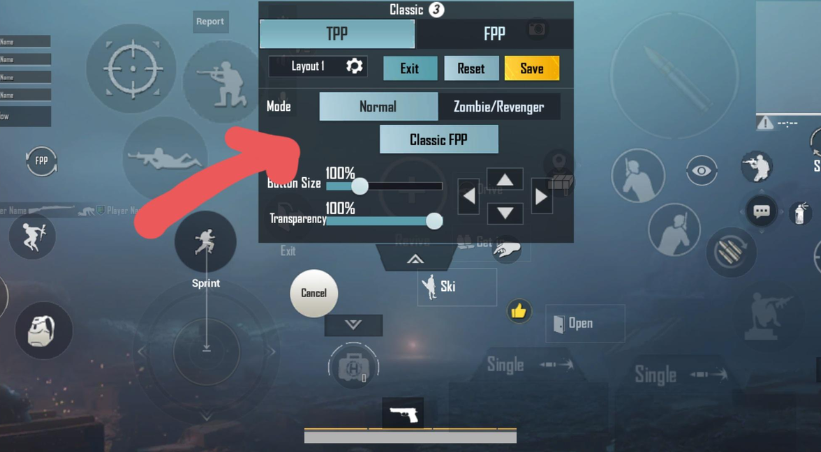
If you’ve ever puzzled why some shots in Battlegrounds Mobile India (BGMI) seem to laser adversaries with ease while yours miss, the explanation is frequently found in one crucial component: sensitivity settings. Correctly adjusting your BGMI sensitivity settings can mean the difference between an early exit and a chicken meal.
We’ll go over everything you need to know about BGMI sensitivity codes, how to determine the best BGMI sensitivity, and tried-and-true settings that maximize accuracy while minimizing recoil in this extensive guide. Whether you’re an experienced player trying to improve your gaming or a novice having trouble with controls, this post has you covered.
What Are BGMI Sensitivity Settings and Why Do They Matter?
Sensitivity settings in BGMI control how quickly your camera and aim respond to your finger movements on the screen. Think of it as the relationship between your touch input and what happens on screen—too high, and your aim becomes jittery and uncontrollable; too low, and you can’t track fast-moving enemies.
The right bgmi sensitivity configuration helps you:
- Track moving targets smoothly without overcompensating
- Control weapon recoil more effectively during sustained fire
- Execute quick 180-degree turns when enemies flank you
- Maintain precision during close-quarters and long-range combat
Many professional BGMI players spend hours tweaking their settings because they understand this fundamental truth: your mechanical skill means nothing if your sensitivity settings are fighting against you.
Read Also: Top 8 Online Platforms That Made Game
Understanding Different Types of Sensitivity in BGMI
Before diving into specific codes and numbers, let’s break down the various sensitivity categories in BGMI:
Camera Sensitivity
This controls how fast your camera moves when you’re not aiming down sights. It includes:
- Camera (Free Look): Movement speed when using the eye icon
- Camera: General camera movement when not in ADS mode
- TPP No Scope: Third-person view without scoping
ADS Sensitivity
ADS (Aim Down Sight) sensitivity determines your aim speed when using weapon scopes:
- Red Dot, Holographic, Aim Assist: For close to mid-range optics
- 2x Scope: Balanced between close and long-range
- 3x, 4x, 6x Scopes: Mid to long-range engagements
- 8x Scope: Long-range sniper engagements
Gyroscope Sensitivity
The gyroscope uses your phone’s motion sensors for aim adjustment. When properly configured, it provides incredibly precise aim control that complements your finger movements.
The Best BGMI Sensitivity Code for No Recoil Control
Many players search for the holy grail: bgmi sensitivity code no recoil. While no setting completely eliminates recoil, the right configuration makes it significantly more manageable.
Here’s a balanced sensitivity code that works exceptionally well for most players:
Camera Sensitivity Settings
- TPP No Scope: 130-150%
- FPP No Scope: 120-140%
- Red Dot, Holographic: 55-65%
- 2x Scope: 45-55%
- 3x Scope: 40-50%
- 4x Scope: 35-45%
- 6x Scope: 30-40%
- 8x Scope: 25-35%
ADS Sensitivity Settings
- TPP: 50-60%
- FPP: 50-60%
- Red Dot: 50-60%
- 2x: 40-50%
- 3x: 35-45%
- 4x: 30-40%
- 6x: 25-35%
- 8x: 20-30%
Gyroscope Sensitivity (Recommended)
- TPP No Scope: 150-200%
- FPP No Scope: 150-200%
- Red Dot: 180-220%
- 2x Scope: 150-180%
- 3x Scope: 120-150%
- 4x Scope: 100-130%
- 6x Scope: 80-110%
- 8x Scope: 50-80%
This best bgmi sensitivity code provides excellent recoil control while maintaining the ability to track targets effectively. However, remember that these are starting points—personal preference plays a huge role.
Read Also: What are the Top Ten Games of All Time
Pro Player Inspired: Best Sensitivity Settings for PUBG Mobile No Recoil
Professional players often use slightly lower sensitivities than casual players because they’ve developed the muscle memory to compensate. Here’s a pro-level configuration that emphasizes recoil control:
|
Setting Type |
Recommended Value |
Purpose |
|
Camera (TPP) |
140% |
Quick camera movement |
|
Red Dot/Holo ADS |
50% |
Stable close-range aim |
|
3x Scope ADS |
38% |
Balanced mid-range control |
|
6x Scope ADS |
28% |
Long-range precision |
|
Gyroscope (Red Dot) |
200% |
Fine aim adjustment |
|
Gyroscope (6x) |
90% |
Sniper stability |
These best sensitivity settings for pubg mobile no recoil are particularly effective with weapons like the M416, AKM, and Beryl M762—guns notorious for their kick.
How to Input a BGMI Sensitivity Code
Using a bgmi sensitivity code is straightforward once you know where to look:
- Open BGMI and tap the settings icon (gear symbol)
- Navigate to “Settings” → “Sensitivity”
- Choose your preferred camera view (TPP or FPP)
- Manually adjust each slider according to your chosen code
- Save your settings and test in Training Mode
- Make micro-adjustments based on your device and playstyle
Pro Tip: Take screenshots of your current settings before making changes so you can revert if needed.
Device-Specific Considerations for BGMI Sensitivity
Your device’s specifications significantly impact what sensitivity works best:
For Low-End Devices (2-4GB RAM)
Lower-end devices may experience frame drops, making high sensitivity feel inconsistent. Consider:
- Reducing camera sensitivity by 10-15%
- Using slightly higher ADS sensitivity to compensate for lag
- Minimizing gyroscope reliance if frame rates are unstable
For Mid-Range Devices (4-6GB RAM)
These devices handle standard settings well:
- Use the balanced sensitivity code provided earlier
- Enable gyroscope for enhanced precision
- Experiment with both high and low sensitivities to find your sweet spot
For High-End Devices (8GB+ RAM)
Premium devices with high refresh rates (90Hz, 120Hz) allow for more aggressive settings:
- Increase camera sensitivity by 15-20% for faster reactions
- Fine-tune ADS sensitivities for pixel-perfect accuracy
- Fully leverage gyroscope capabilities
The Role of Gyroscope in BGMI Sensitivity Settings
The gyroscope is often underutilized by beginners but is a game-changer for advanced players. When enabled, you can make precise aim adjustments by tilting your phone rather than relying solely on finger swipes.
Gyroscope Benefits
- Superior recoil control: Tilting your device downward counteracts vertical recoil
- Tracking consistency: Smooth horizontal tracking of moving enemies
- Quick flicks: Instant aim adjustments without lifting your thumb
How to Practice with Gyroscope
- Start with moderate gyroscope sensitivity (150-180% for red dot)
- Practice in Training Mode by shooting at walls and controlling spray patterns
- Gradually increase sensitivity as you build muscle memory
- Use gyroscope primarily for vertical recoil control during sprays
Common Mistakes When Adjusting BGMI Sensitivity
Even experienced players make these errors when tweaking their bgmi sensitivity settings:
Copying Pro Settings Blindly
What works for a professional player with thousands of hours might not work for you. Your device, finger size, grip style, and experience level all matter. Use pro settings as inspiration, not gospel.
Changing Settings Too Frequently
Constantly switching sensitivity prevents you from developing muscle memory. Give each configuration at least 20-30 matches before deciding it doesn’t work.
Ignoring Training Mode
Don’t test new settings in ranked matches. Spend time in Training Mode or TDM (Team Deathmatch) to practice recoil control and target tracking before committing.
Using Same Settings for All Scopes
Different scopes require different sensitivities. A 2x scope engagement feels completely different from an 8x scope battle. Customize each scope individually.
Step-by-Step Guide to Finding Your Perfect Sensitivity
Here’s a systematic approach to discovering your ideal best sensitivity for bgmi:
Step 1: Start with the Baseline Begin with medium sensitivity (50% across the board) as your control group.
Step 2: Adjust Camera Sensitivity Test how quickly you can do a 180-degree turn. Adjust until it feels natural—not too sluggish, not too twitchy.
Step 3: Fine-Tune ADS Sensitivity Pick your most-used weapon (typically M416 or AKM) and practice controlling its recoil. Adjust red dot sensitivity until you can land consistent sprays.
Step 4: Calibrate Scope-Specific Settings Test each scope individually. Higher magnification scopes should have progressively lower sensitivity.
Step 5: Incorporate Gyroscope Once your finger sensitivity feels right, enable gyroscope and start low. Gradually increase until you can comfortably control recoil by tilting your device.
Step 6: Real-World Testing Play 10-15 casual matches and note situations where your aim felt off. Make small adjustments (5-10% changes) accordingly.
Advanced Tips for Recoil Management Beyond Sensitivity
While the best bgmi sensitivity code helps immensely, recoil control also depends on:
Weapon Attachments
- Compensator: Reduces vertical and horizontal recoil
- Vertical Grip: Minimizes vertical kick (best for spraying)
- Half Grip: Balances vertical and horizontal control
- Tactical Stock: Reduces aim shake and improves recovery
Burst Firing Technique
Instead of holding down fire, shoot in 3-5 round bursts. This allows the weapon to reset between bursts, improving accuracy.
Proper Crosshair Placement
Keep your crosshair at head level when moving. This reduces the adjustment needed when encountering enemies.
Gyroscope Compensation
When spraying, gently tilt your device downward to counter vertical recoil. This technique, combined with proper sensitivity, creates laser-like accuracy.
BGMI Sensitivity Codes from Popular Content Creators
Many players look for proven codes from successful streamers. While we recommend customization, here are some popular starting points:
For Aggressive Players (High Mobility Focus):
- Camera: 160-180%
- ADS (Red Dot): 60-70%
- Gyroscope: 200-250%
For Sniper Mains (Precision Focus):
- Camera: 120-140%
- ADS (6x/8x): 20-30%
- Gyroscope (Scoped): 50-80%
For Balanced Gameplay (All-Rounder):
- Camera: 140-160%
- ADS (Red Dot): 50-60%
- Gyroscope: 180-200%
The Connection Between Sensitivity and Device Grip
Your playing style and grip should influence your sensitivity choices:
Claw Grip Users
Players using three or four fingers can afford higher sensitivities because they have dedicated fingers for aiming and shooting separately.
Thumb-Only Players
Two-thumb players typically need lower ADS sensitivity to maintain accuracy since their shooting thumb also controls aim.
Gyroscope-Heavy Players
If you rely heavily on gyroscope, you can use slightly lower finger sensitivity and compensate with device tilt for fine adjustments.
Conclusion: Your Path to Perfect BGMI Sensitivity Settings
Finding your ideal BGMI sensitivity settings is a personal journey that combines testing, practice, and patience. While this guide provides proven bgmi sensitivity codes and the best sensitivity for BGMI based on different playstyles, the ultimate configuration depends on your unique combination of device, preferences, and mechanical skill.
Start with the balanced sensitivity code we’ve provided, test it thoroughly in Training Mode, and make incremental adjustments based on your performance. Remember that even small changes (5-10%) can have significant impacts on your gameplay.
The best bgmi sensitivity code isn’t the one used by your favorite streamer—it’s the one that helps YOU win more gunfights and secure more chicken dinners. Invest time in finding it, and your rank will reflect that dedication.
Ready to dominate your next match? Apply these settings today, practice in Training Mode for 30 minutes, then jump into a match and feel the difference. Your improved aim and recoil control will speak for themselves!
Read Also: Best Horror Games To Play In The Dark
Frequently Asked Questions (FAQs)
Q1. What is the best BGMI sensitivity setting for beginners?
Start with camera sensitivity around 140% and red dot ADS at 50%. Keep gyroscope off initially until you build some muscle memory. Do not copy pro settings right away. Spend 20 to 30 matches with one configuration before changing anything. Small, gradual adjustments work far better than constantly switching numbers after every bad game.
Q2. What is a good BGMI sensitivity code for no recoil?
No single code eliminates recoil completely, but a solid starting point is red dot ADS at 55%, 4x scope at 35 to 40%, and gyroscope at 180 to 200% for red dot. Pair these settings with a compensator or vertical grip on your weapon. Consistent practice in Training Mode matters more than chasing a perfect code.
Q3. Should I use gyroscope in BGMI or not?
Yes, gyroscope is genuinely worth learning. It gives you tighter recoil control, especially during sprays. Start at 150% for red dot and tilt your phone slightly downward while firing. It feels awkward at first but clicks after regular practice. If your phone drops frames heavily, skip it for now since unstable frame rates make gyroscope feel completely broken.
Q4. How do I find the best sensitivity for BGMI on my phone?
Start at 50% across all settings, then adjust camera sensitivity until a 180-degree turn feels natural. Next, tune your red dot ADS using the M416 or AKM in Training Mode. Work through each scope one by one. Your device RAM and screen refresh rate also matter, so low-end phones generally need 10 to 15% lower values overall.
Q5. Why does my aim feel shaky even after adjusting BGMI sensitivity?
Shaky aim usually means your camera or ADS sensitivity is set too high. Drop it by 10% and test again. Frame rate drops from background apps can also cause jitter. Close everything before playing. If you use gyroscope, unstable grip or a cracked screen protector can throw off motion detection. Grip style and finger placement affect aim consistency more than most players realize.